
|
|
ORDERS EXERCISE
You run a small mail order business. You would like to be able to track orders by customer, by product, and by date. Specifically, you have become aware that some of your suppliers may not be able to deliver when they promised, and you want to know what the impact of backorders for selected products will be. To know this, you will need to know which customers ordered what products, and when they placed the orders. You will also want to know how best to contact the customers by telephone, if necessary.
You know that each customer may order one or more products at a time. You also have come to understand that most customers have more than one telephone number. Including home, office, fax, and mobile telephones, some customers may have four or more numbers.
These details pose a new problem: how should you best track this data in your database? If you try to put it all in one table, you will have one enormous table with lots of blank space for telephone numbers (surely not every customer has four phone numbers) and repeated addresses for each product in each order (wouldn't it be easier to maintain one copy of the address no matter how many products were ordered?).
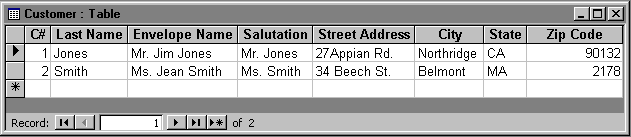
Build an Access database that defines tables for Customers and Products. Customers have an envelope name, salutation, address (street, city, state, zip), and an indeterminate number of telephone numbers. Products have at minimum a product name and a price. Since some product names might be very similar, use a unique Product ID number to identify products. Shipping charges are expected to be 10% of product price.
Products (and prices) include Raccoon coats, $3,000.00 ea., Survival dry suits, $3,000.00 ea., Crampons, $150.00 a pair, Mountain tents, $200.00 ea., and Stanford (University) pennants, $30.00 ea.
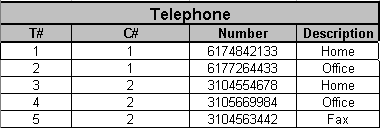
You still have two customers, Smith and Jones. Both have multiple telephone numbers. Jones has home ((617) 484-2133) and office ((617) 726-4433) numbers. Smith has home ((310) 455-4678), office ((310) 566-9984), and fax numbers ((310) 456-3442).
Jones has ordered 1 raccoon coat and 5 Stanford pennants. Smith has ordered 1 survival dry suit, 1 mountain tent, and 1 pair of crampons. Jones placed his orders on January 20, 1996. Smith placed her orders for the dry suit and crampons on February 1, 1996. She ordered the mountain tent on February 2, 1996.
Design database tables and queries that enable you to know (1) when orders were placed, (2) what customers have ordered what products, and (3) what shipping charges were for each product.
The steps include:
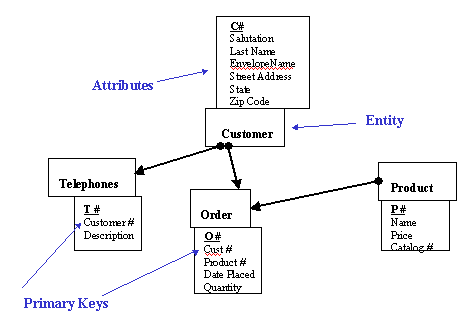
Database tables that match to the ERD can be made with Excel and pasted into Access, or made directly in Access. The table below is the Telephone table for the Orders exercise.
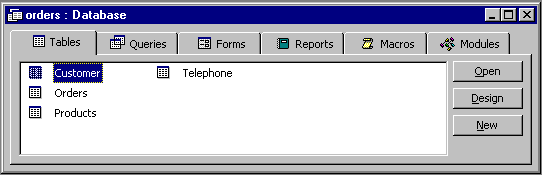
A nice feature of Access is the ability to view the entity relationships by going to the Tools menu and clicking on Relationships. This provides a glimpse of the relationship types. The screen shot below shows the importance of the Orders linking table in breaking up a many to many relationship.
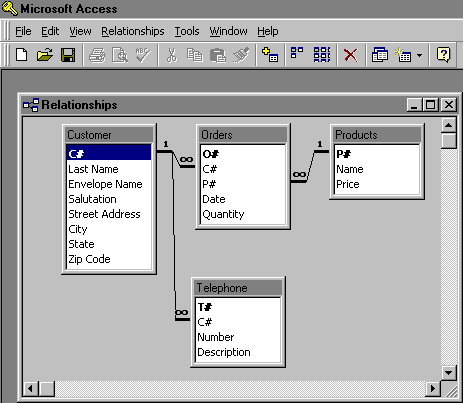
Entity-relationship diagrams provide a good way to visualise a database in the design process. They form the basis for the development of a real-world database. Other systems are currently being developed that seem set to take over from Entity-relationship modelling; particularly UML.
In the Library Loans example:
| Student Number | Family Name | First Name | Enrolment Date | Code | Title | Author | Publisher |
| 9555 0001 | Einstein | Albert | 31/01/98 | S100.1 | Hydraulics | Noble A. | Sems |
| 9555 0001 | Einstein | Albert | 31/01/98 | T200.3 | Electrolytes and you | Ignobe B. | Quew |
| 9555 0033 | Smith | Winston | 28/02/97 | U300.5 | Shoe Horns for Fun & Profit | Peddley A. | MacGrew-Hull |
We have two entities - students and books. The relationship between Students and Books is one-to-many since only one student can borrow a book at a time (we are assuming separate copies of a book are stored separately on the database.)
The entity-relationship diagram is as follows. 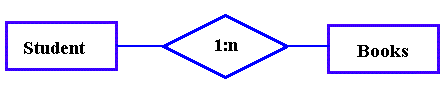
Suppose a student belongs to a faculty (Business, Engineering, Computer Science etc.)
But a faculty can have many students. The entity-relationship diagram for this situation
would be. 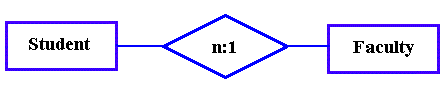
This is a many-to-one relationship. We could combine the above to form: 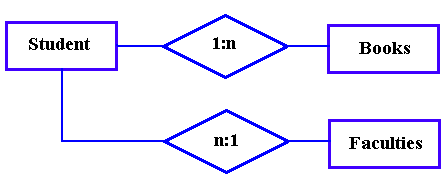
Some relationships between entities are many-to-many. For example, one class, e.g.
DP036, can have many students. Also, one student can be in many classes. So this
relationship is many-to-many and we draw this as: 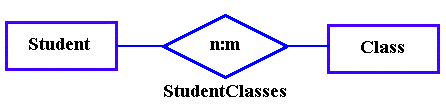
Note that many-to-many relationships usually require a separate table. In this case, we will give the relationship a name in the ER diagram. For example, we could name the N:M relationship above StudentClasses. We would not put StudentClasses in the diagram as an entity. Firstly, this makes the diagram unnecessarily more complex. Secondly, StudentClasses is a relationship, it is not an "entity" in any reasonable sense.